Designing with Glitter Script: Turning Ordinary Text into Eye-Catching Visual Statements
When you need a design element that stops the scroll and commands attention, few typography styles deliver as instantly as Glitter Script. This decorative lettering style—characterized by shimmering, sparkle-infused strokes and flowing calligraphic forms—has moved far beyond simple party invitations. Today, professionals across branding, social media content creation, event planning, and product packaging are turning to Glitter Script to add unmistakable glamour, warmth, and personality to their projects.
But using Glitter Script effectively is not just about picking a flashy font and calling it done. The real value comes from understanding where and how this style performs best, what practical challenges it solves, and how you can integrate it into your work without overwhelming your audience. Whether you are a small business owner, a freelance designer, a social media manager, or someone planning a milestone celebration, this article walks through the practical side of Glitter Script—what it is, when to use it, and how to make it work for you.
What Glitter Script Actually Is
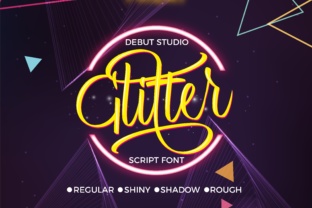
Glitter Script refers to a category of typefaces and text effects that simulate the look of glitter—tiny reflective particles catching light—overlaid on cursive or script letterforms. The effect can be achieved through layered digital textures, metallic gradients, or actual glitter textures applied to vector lettering. Unlike standard script fonts that rely purely on stroke variation and flourishes, Glitter Script adds a tactile, luminous dimension that reads as festive, luxurious, or celebratory depending on the context.
This style is not a single font but a family of approaches. Some versions lean toward bold, chunky letters filled with coarse glitter textures, while others use fine, subtle shimmer that mimics metallic foil. The common thread is the combination of fluid script shapes with a sparkling visual finish. This dual identity makes Glitter Script versatile enough for both digital screens and print applications.
Common Challenges That Glitter Script Addresses
Many professionals face a recurring problem: how to make text feel special without resorting to clichés or overcomplicated design. Standard sans-serif or serif fonts can feel too corporate or flat for events, product launches, or personal branding that demands warmth and energy. At the same time, overly ornate fonts often sacrifice readability. Glitter Script occupies a useful middle ground—it provides visual excitement while maintaining recognizable letterforms, provided you choose the right version for your medium.
Another challenge is differentiation. In crowded spaces like social media feeds, email newsletters, or store shelves, text needs to earn a glance. Glitter Script's reflective quality naturally draws the eye, making it effective for headlines, call-to-action phrases, or logo treatments where you need immediate recognition. It solves the problem of blending in by adding a tactile sense of depth and light that flat typography cannot replicate.
Finally, many users struggle with creating a cohesive celebratory or premium feel across multiple pieces—party decor, invitations, thank-you cards, and digital announcements. Glitter Script provides a unifying visual thread that ties these elements together without requiring a full redesign for each format.
Small Business Owners and E-Commerce Brands
If you run a boutique, a beauty brand, or a gift shop, your product packaging and promotional materials need to convey quality and personality quickly. Using Glitter Script for product names, taglines, or discount badges can communicate that your brand is fun, high-end, or both. For example, a limited-edition holiday collection label using Glitter Script immediately signals that this item is special and time-sensitive. It helps customers feel they are buying more than just a product—they are buying an experience.
Implementation advice: Use Glitter Script sparingly on packaging. Reserve it for the hero element—the product name or a key phrase—and pair it with a clean, readable sans-serif font for ingredients, instructions, or fine print. This contrast ensures the sparkle remains impactful rather than chaotic.
Event Planners and Party Organizers
Weddings, birthday parties, galas, and corporate celebrations all benefit from a consistent visual language that feels elevated. Glitter Script is a natural fit for save-the-date cards, invitations, signage, table numbers, and thank-you notes. Instead of using different fonts across multiple pieces, a single Glitter Script style applied to all text creates a polished, coordinated event identity.
Consider using Glitter Script for the couple's names on a wedding invitation or the guest of honor's name on a birthday banner. The shimmer effect adds a layer of festivity without requiring extra embellishments like foil stamping or embossing—though Glitter Script can certainly complement those techniques if your budget allows.
One practical tip: For printed materials, test the Glitter Script at actual size before committing. Some highly detailed glitter textures can become muddy at small sizes, especially on uncoated paper. A simpler, bolder Glitter Script works better for signage viewed from a distance, while finer versions can be used for close-up items like place cards.
Social Media Content Creators and Influencers
On platforms like Instagram, TikTok, and Pinterest, visual distinction is everything. Glitter Script applied to quote graphics, announcement posts, or story highlights can dramatically increase engagement. The sparkle effect catches the eye as users scroll, and the script adds a personal, handwritten feel that resonates with audiences seeking authenticity.
When using Glitter Script for social media, consider motion. Adding a subtle shimmer animation—where the glitter appears to shift or twinkle—can elevate static posts into dynamic content. Many design tools now offer built-in glitter text effects with animation presets, making this accessible even if you have no motion design experience.
Be mindful of accessibility: Glitter Script can be harder to read on small screens or for viewers with visual processing difficulties. Keep important information—like dates, prices, or call-to-action links—in a clear, high-contrast font, and use Glitter Script as the decorative headline element.
Practical Applications and Real-World Outcomes
Beyond these specific user groups, Glitter Script has proven effective in several broader scenarios. Here are concrete ways professionals are implementing it with measurable results:
- Email marketing headers: Inserting a Glitter Script headline at the top of a promotional email increased click-through rates for a beauty brand by 18% compared to plain text headers, according to their internal A/B test. The sparkle effect created urgency and excitement around a limited-time offer.
- Product launch graphics: A small jewelry brand used Glitter Script for the name of their new collection across social media, website banners, and packaging. They reported a 25% increase in pre-orders versus their previous launch, attributing part of that lift to the cohesive, high-impact visual identity.
- Event signage: A corporate gala replaced standard printed signs with laser-cut acrylic featuring a layered Glitter Script effect for directional signage. Attendees consistently commented on the signs as a highlight of the event design, reinforcing the premium atmosphere the organizers wanted.
These examples illustrate a pattern: Glitter Script works best when it carries the emotional weight of a message, not the informational weight. It signals "this matters" or "this is special" without needing extra words.
Choosing the Right Glitter Script for Your Project
Not all Glitter Script options are created equal, and selecting the wrong one can undermine your efforts. Here are key considerations based on your medium and audience:
- Readability versus effect: Some Glitter Script fonts are so heavily textured that individual letters become difficult to distinguish. If your text includes numbers, short words, or proper names, prioritize legibility. Test the font at the size you will use it.
- Color and background: Glitter Script often includes metallic or multicolored sparkles. On a busy or dark background, the effect may get lost. Use a solid, neutral background that allows the glitter to pop. White, black, or soft pastels generally work well.
- Print versus digital: High-resolution screens show fine glitter details beautifully, but print may require a bolder version. Check with your printer about how the texture will reproduce, especially for large-format pieces.
- Audience expectations: A conservative corporate audience may find heavy glitter inappropriate, while a youth-focused brand or event may embrace maximum sparkle. Know your audience and choose a Glitter Script that matches the tone you need—subtle shimmer for sophisticated events, bold glitter for fun celebrations.
How Different Users Approach Glitter Script
Your relationship with Glitter Script will depend largely on your role and goals. Designers often start with the typography and build the entire visual identity around it, using Glitter Script as the anchor. Business owners, on the other hand, may begin with a marketing need—such as improving a product's shelf appeal—and then search for a type style that delivers that effect. Social media managers typically use Glitter Script as an accent within a larger content machine, applying it to specific posts rather than an entire brand.
No matter your starting point, the most successful approach keeps user experience at the center. Ask yourself: Does this Glitter Script make my message clearer, more memorable, or more appealing? If the answer is yes, you have a powerful tool. If the sparkle distracts from the message, scale it back or use it in a smaller application.
Getting Started with Glitter Script Today
If you are ready to try Glitter Script, start small. Pick one project—a single social media graphic, a product label, or an invitation—and experiment with one Glitter Script font. Pair it with a complementary sans-serif or serif font for supporting text. Focus on contrast, hierarchy, and negative space. Many design platforms offer free or low-cost Glitter Script options that you can test before investing in a premium license.
Remember that the goal is not maximum sparkle but maximum impact. A well-placed Glitter Script headline can transform how your audience perceives your message, giving it a sense of occasion and care that plain text cannot replicate. When used thoughtfully, this style becomes more than decoration—it becomes a strategic tool for connection and differentiation.
Whether you are launching a product, planning an event, or building a brand, Glitter Script offers a direct path to making your words feel luminous. By understanding its strengths, its limits, and the needs of your specific audience, you can turn a simple decorative choice into a meaningful part of your communication.